

表单里使用延时函数实现某些js效果
1. 问题描述
有的时候有些js代码在cpt里可以运行成功,但是在表单里会没有效果,举例:
分页预览改变鼠标悬停所在行背景色的代码,在表单的报表块使用,预览时没有效果。
2. 实现思路
这是由于表单里没有加载结束后事件,只有初始化后事件,但是我们需要在表单加载结束后再执行这段代码,因此我们在代码前面加上setTimeout()延时函数就可以起作用了。
setTimeout(function(){ },1000);
3. 实现步骤
选中表单报表块,在右侧的报表块事件面板添加一个初始化后事件。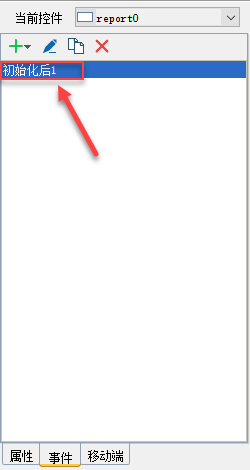
编辑该事件添加下面的js代码:
setTimeout(function(){
var background_color = "rgb(255,0,0)";
var frozen_back_color = new Array();
var back_color = new Array();
var $last_tr;
var i = 0;
$(".x-table tr").bind("mouseenter", function () {
if (typeof($last_tr) != "undefined") {
if (typeof($(this).attr("id")) != "undefined") {
if (typeof($("#content-container #frozen-west").attr("id")) != "undefined") {
$("#content-container #" + $last_tr.attr("id")).each(function () {
$(this).children("td").each(function () {
$(this).css("background-color", frozen_back_color[i][$(this).index()]);
});
i = i + 1;
});
i = 0;
}
else {
$last_tr.children("td").each(function () {
$(this).css("background-color", back_color[$(this).index()]);
});
}
frozen_back_color = [];
back_color = [];
}
}
if (typeof($(this).attr("id")) != "undefined") {
if (typeof($("#content-container #frozen-west").attr("id")) != "undefined") {
$("#content-container #" + $(this).attr("id")).each(function () {
frozen_back_color[i] = new Array();
$(this).children("td").each(function () {
frozen_back_color[i][$(this).index()] = $(this).css("background-color");
$(this).css("background-color", background_color);
});
i = i + 1;
});
i = 0;
}
else {
$(this).children("td").each(function () {
back_color[$(this).index()] = $(this).css("background-color");
$(this).css("background-color", background_color);
});
}
}
});
$(".x-table tr").bind("mouseleave", function () {
if (typeof($(this).attr("id")) != "undefined") {
$last_tr = $(this);
}
});
},1000);
附件列表
主题: 二次开发