

目录:
Overview编辑
FineBI supports various functions. These functions have some differences in usage compared to commonly used Excel functions. This document provides a comparison explanation to help you with a basic understanding of Excel quickly get started using functions and features in BI.
Aggregate Function编辑
FineBI Function | Excel Function | Function Description |
| SUM_AGG | SUM() | Calculates the sum of a set of data. |
AVERAGE() | Calculates the average of a set of data. | |
MAX() | Calculates the maximum value of a set of data. | |
MIN() | Calculates the minimum value of a set of data | |
COUNT() | Calculates the number of cells that contain digits and the number of digits in the parameter list. |
Notes:
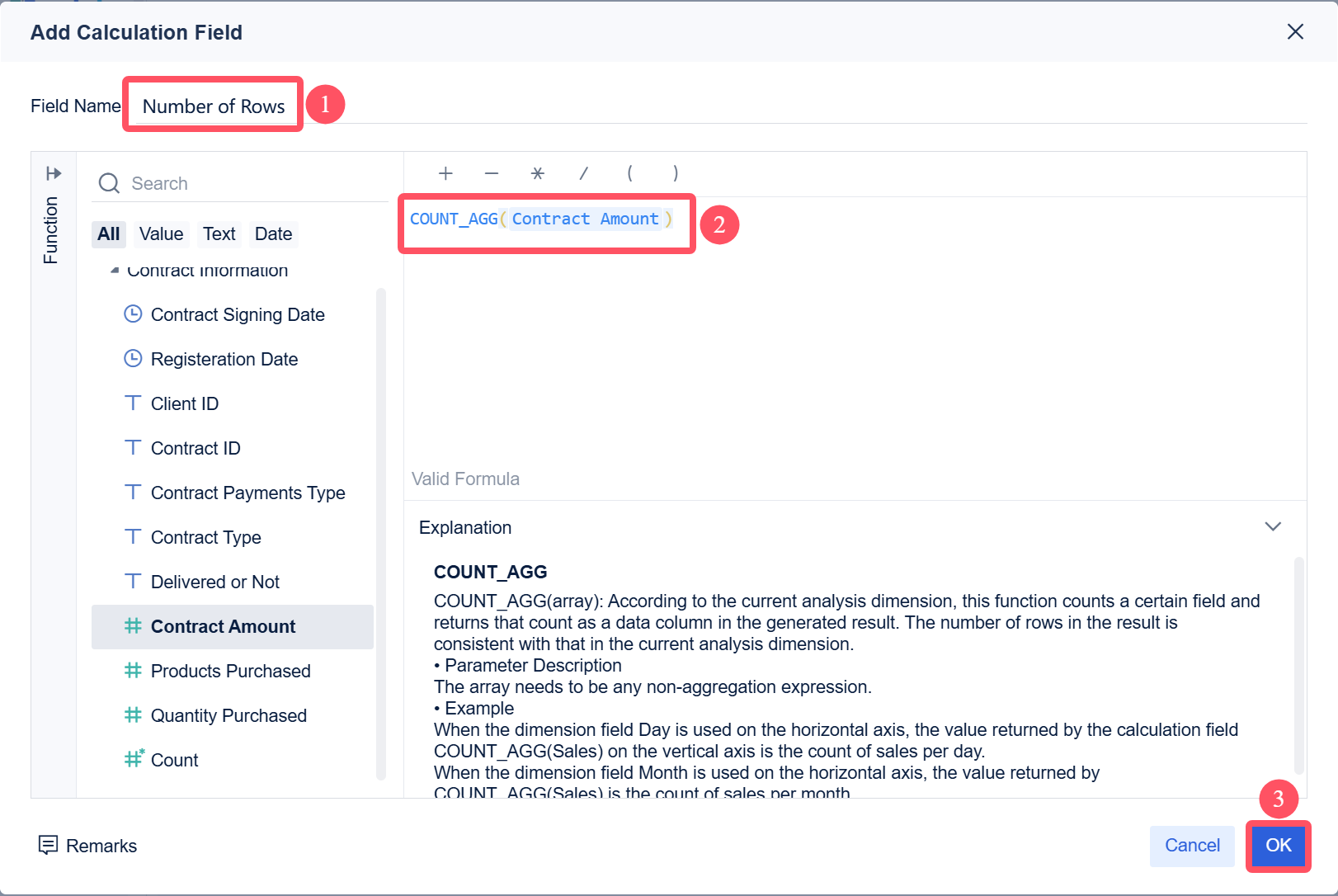
Calculate the number of rows of cells with amounts by the COUNT_AGG function, namely, the number of non-empty cells with amounts, as shown in the following figure.
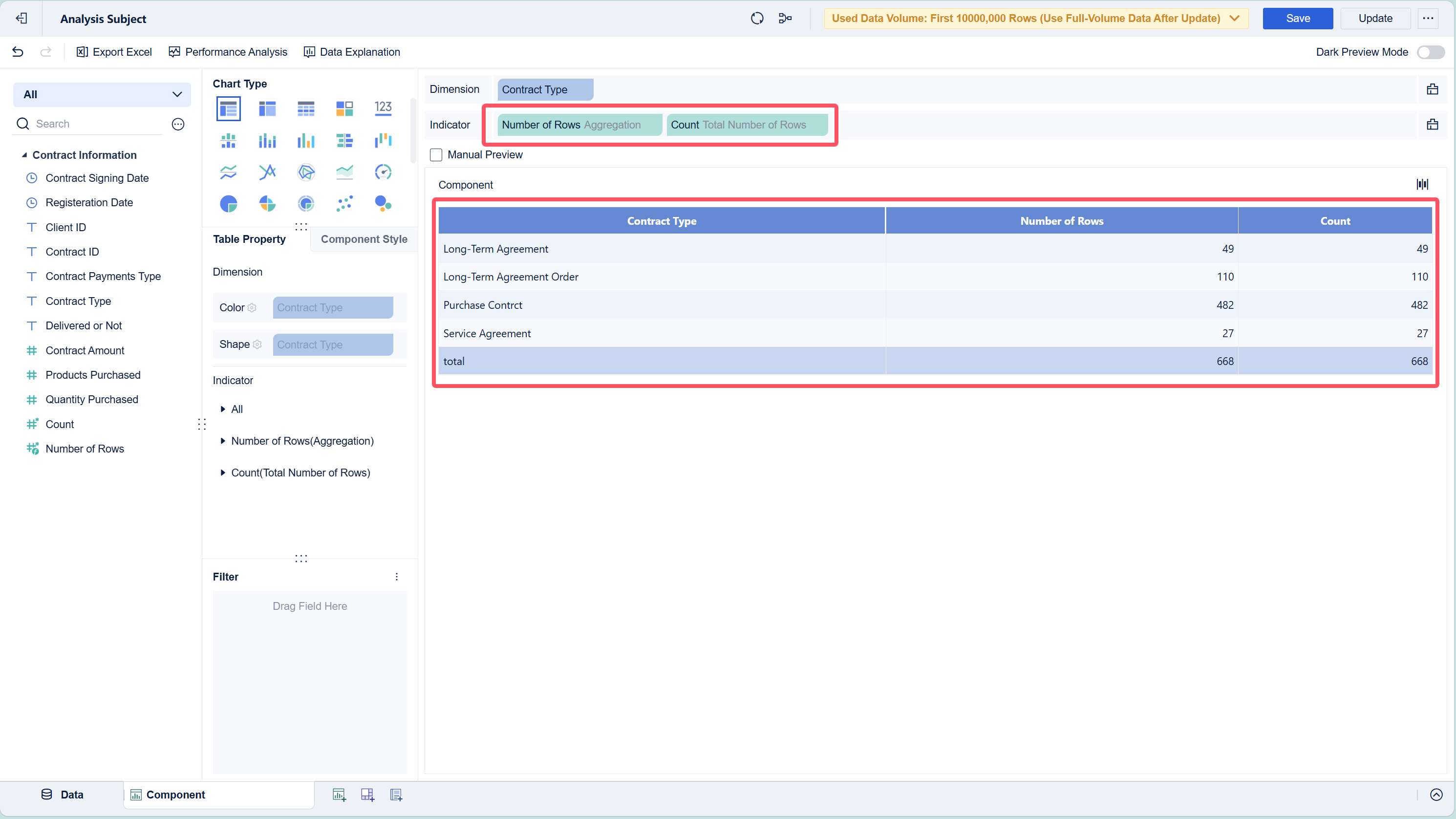
You can also use Count directly, as shown in the following figure.
Statistic Function编辑
FineBI Function | Excel Function | Function Description |
IF(Boolean,Number1/String1,Number2/String2) | IF(Logical_test,Value_if_true,[Value_if_false]) | Perform the condition judgment. |
Use DEF/DEF_ADD in combination with SUM_AGG. For example, calculate the sales volume of the furniture category in Yunnan province. DEF(SUM_AGG(Sales),[],[Province="Yunnan",Category="Furniture"]) | SUMIF/SUMIFS | Summarizes the conditions. |
Use DEF/DEF_ADD in combination with COUNTD_AGG. For example, calculate the order quantity of Yunnan province. DEF(COUNTD_AGG(Order Number),[],[Province="Yunnan"]) | COUNTIF/COUNTIFS | Counts the conditions. |
Use DEF/DEF_ADD in combination with AVG_AGG. For example, calculate the average sales volume per order for the furniture category. DEF(AVG_AGG(Sales Volume),[],[Category="Furniture"]) | AVERAGEIF/AVERAGEIFS | Calculates the average value for the conditions. |
Logic Function编辑
FineBI Function | Excel Function | Function Description |
Nested IF function | IFS | Checks if one or more conditions are met and returns the value that satisfies the first TRUE condition. |
NOT | Negates the logic of the parameter. | |
IFERROR | Returns the specified value if the formula calculation result is faulty, or returns the formula calculation result if the formula calculation result is correct. | |
AND | Logical AND | |
OR | Logical OR |
This document provides an example of applying the IFERROR function in BI. The example shows the sales volume and sales quantity, and the corresponding product sales price needs to be calculated.
Sample data:Sales.xlsx
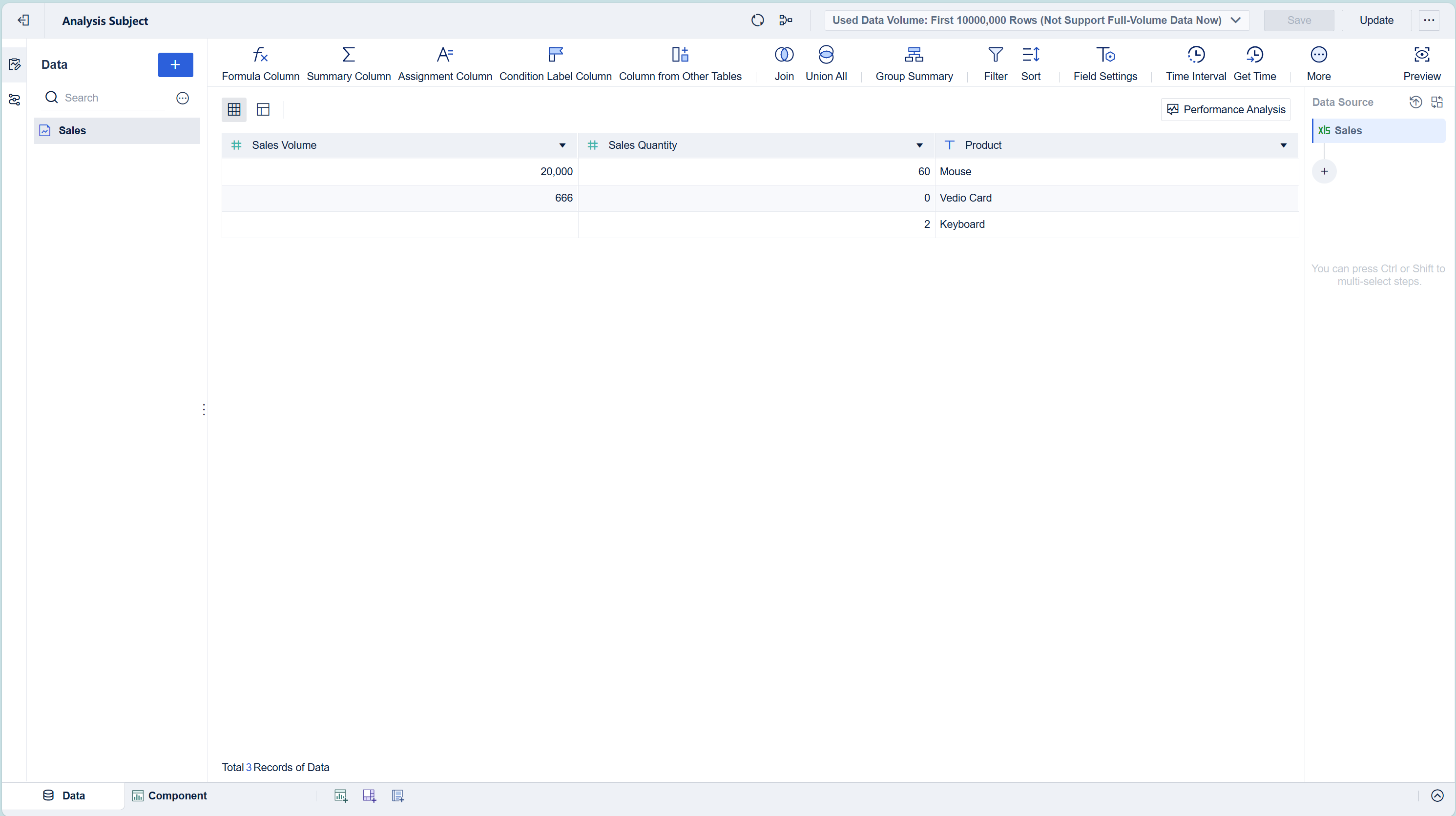
Upload the sample data to FineBI, as shown in the following figure.
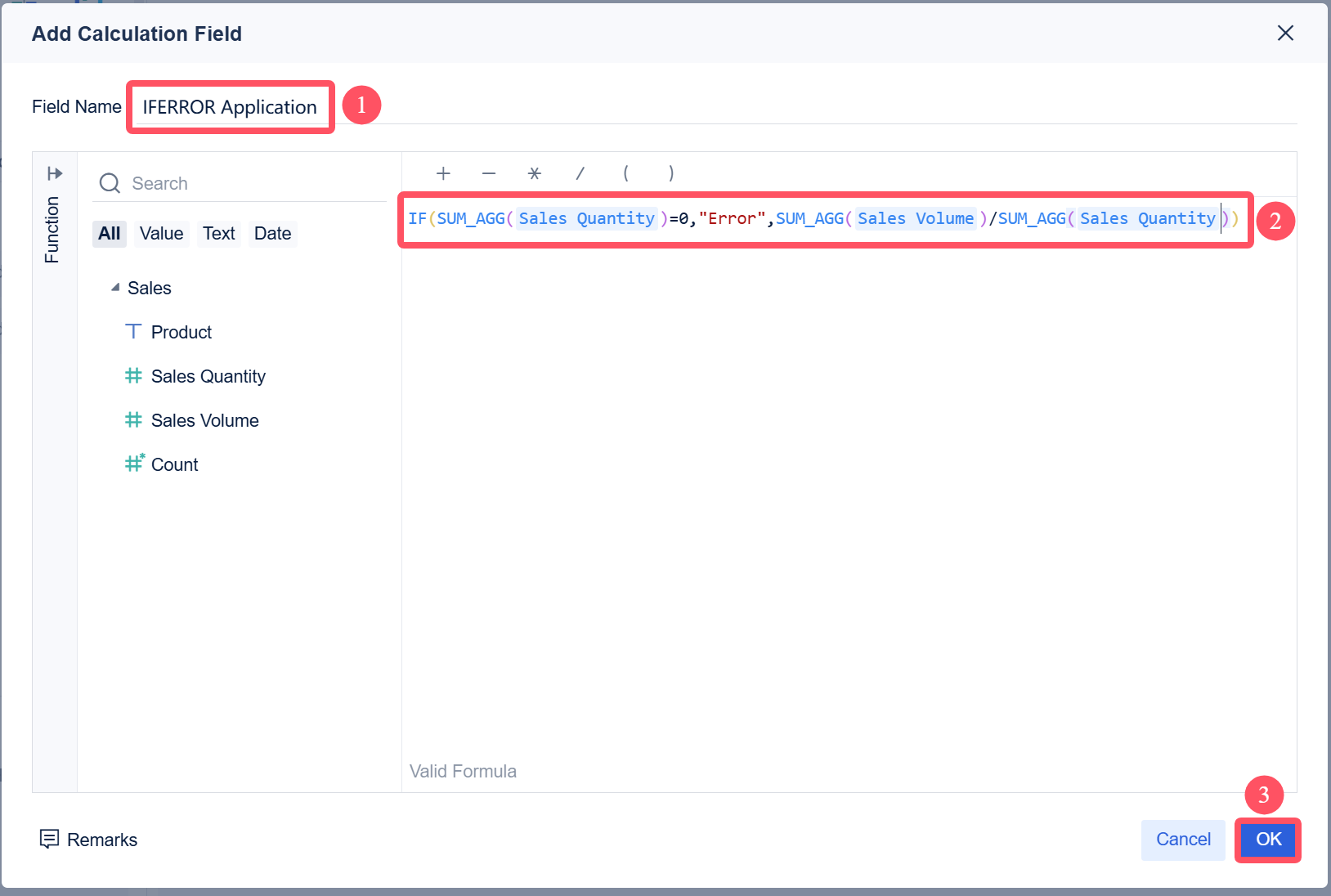
After creating a dashboard using the dataset, select Add Calculation Field and enter IF(SUM_AGG(Sales Quantity)=0,"Error",SUM_AGG(Sales Volume)/SUM_AGG(Sales Quantity)).
To calculate the unit price, you need to use the aggregate function SUM_AGG(Sales Volume)/SUM_AGG(Sales Quantity). To ensure the correctness of the calculation results, you need to use the IF function to determine if Sales Quantity is 0. Since the aggregate functions and non-aggregate functions cannot be used simultaneously in the IF function, the judgment also needs to be in the format (SUM_AGG(Sales Quantity)=0), as shown in the following figure.
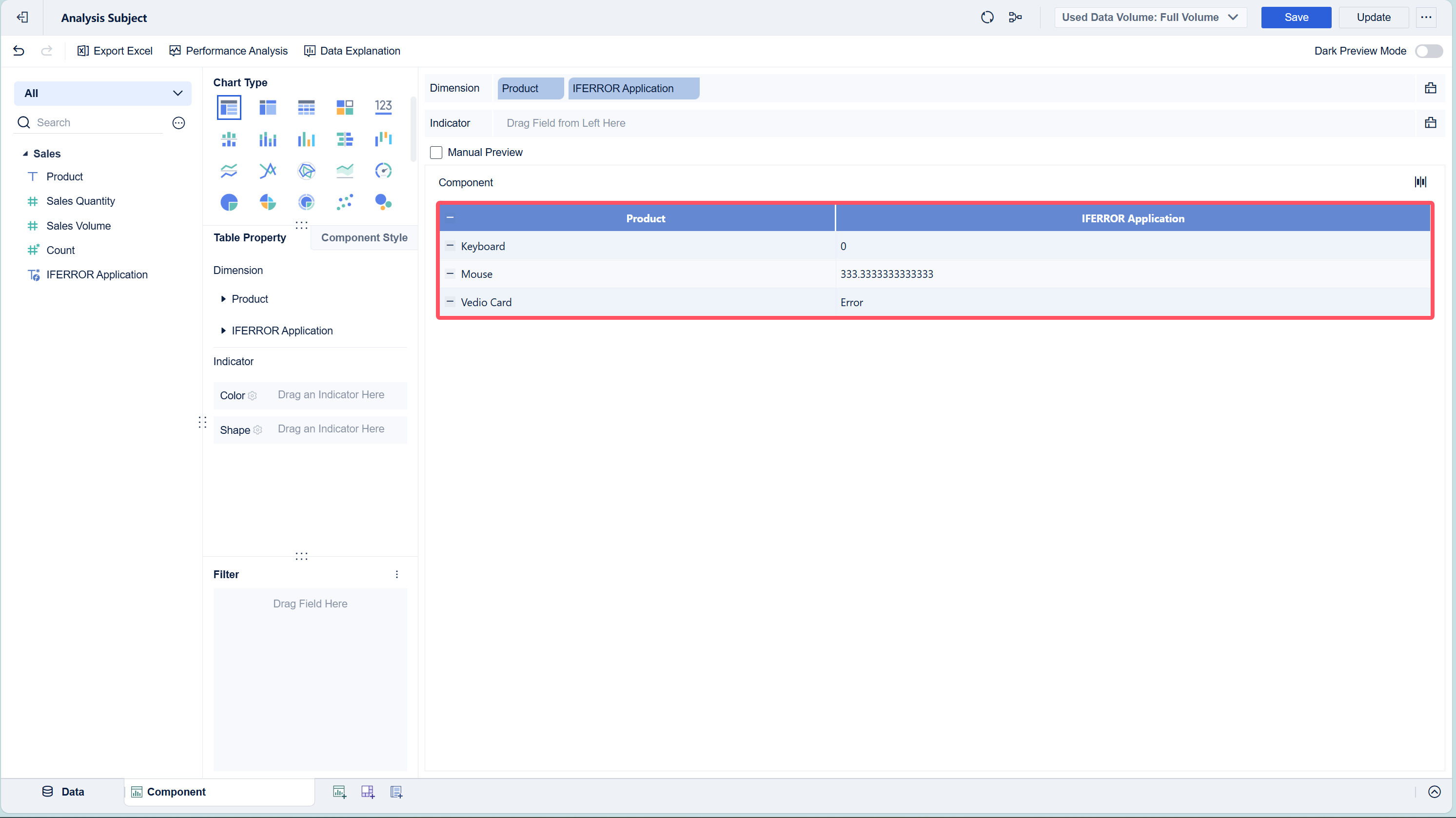
Drag Product and the new field into the analysis bar to get the results, as shown in the following figure.
Formula | Description | Result |
IF(SUM_AGG(Sales Quantity)=0,"Error",SUM_AGG(Sales Volume)/SUM_AGG(Sales Quantity)) | If the value of Sales Quantity is 0, the division cannot be performed, and the output is Error. | Error |
If the value of Sales Quantity is not 0, the output is the calculation result. | 0 333.333333333 |
Reference Function编辑
FineBI Function | Excel Function | Function Description |
First, rank required data in the dataset. Use the IF function to write conditional assignments for the dataset/dashboard. | Match | Finds the rows that are equal to or close to the query value of the row position. |
This document provides an example of applying the MATCH function in BI.
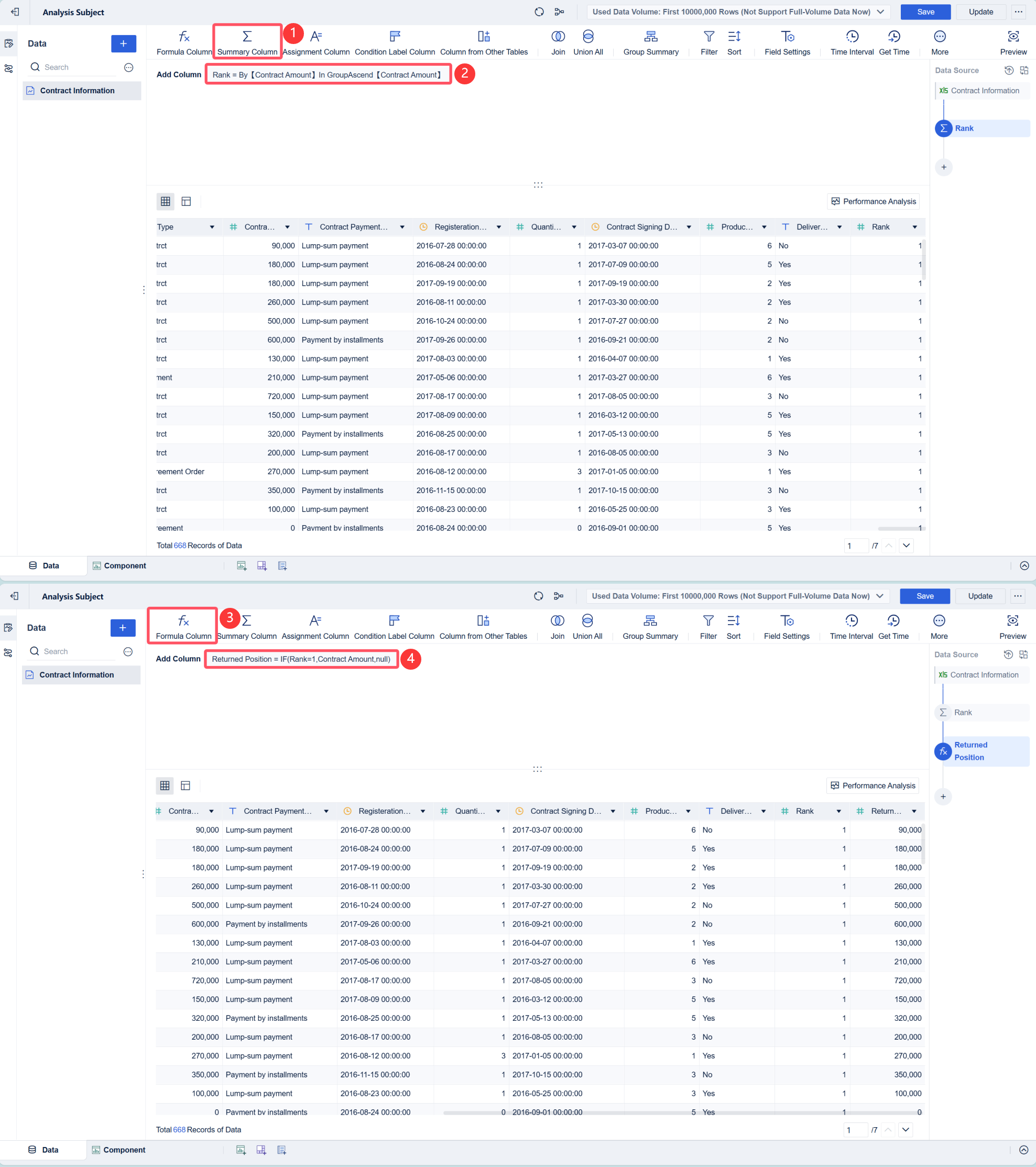
For example, if you need to calculate Contract Amount ranked first in ascending order, you can first rank the data of Contract Amount in the dataset, and then use the function to return the specified data. The following figure shows the result.
Text Function编辑
FineBI Function | Excel Function | Function Description |
LEN | Calculates the length of the field. | |
LEFTB is not supported. | LEFT and LEFTB | Returns the first character(s) in a text string, based on the number of characters you specify. |
The RIGHTB function is not supported. | RIGHT and RIGHTB | Returns the last character(s) in the text string from the right, based on the number of characters you specify. |
The MIDB function is not supported. | MID and MIDB | Returns a specified number of characters from a specified position in a specified text string. |
TRIM | Clears all spaces at the beginning and end of the text. | |
The FINDB function is not supported. | FIND and FINDB | Returns the position of a specified character in a text string. |
Not supported To return the position of a specified character in text, you can use the FIND function. | SEARCH and SEARCHB | Returns the position of a specified character in a text string. |
1. CONCATENATE 2. Data > Group Summary > CONCATENATE  Note: Note: | CONCATENATE | Concatenates two or more strings into one. |
1. Use the IF function to convert numerical values to the specified text when adding calculation indicators. 2. The value returned by the CONCATENATE function is of the text type by default, so you do not need to use the TEXT function for conversion. | TEXT | The TEXT function can apply formats to numbers through formatting codes, thereby changing the display formats of numbers. |
Numeric Function编辑
FineBI Function | Excel Function | Function Description |
ROUND | The ROUND function rounds a number to a specified number of digits. | |
MOD | Return the remainder after the number is divided by the divisor. The result has the same sign as the divisor. | |
The function is not supported in FineBI. You can convert a metric value to the specified value by adding a calculation field. | CONVER | Converts a metric value to the specified value. |
Add calculation indicators and multiply two fields together. | SUMPRODUCT | Returns the sum of the number of the corresponding range or array. The default operation is multiplication. |
RANK | Returns the numerical ranking of a list of data. | |
SUBTOTAL | Returns the category summary in a list or database. |
Date Function编辑
FineBI Function | Excel Function | Function Description |
| Note: | WEEKDAY | Returns the day of the week corresponding to a date. |
DATEDIF(Start_date,End_date,Unit) | DATEDIF | Returns the number of days, months, or years between two specified dates. |
DATE | Returns a serial number for a specific date. | |
TODAY | Returns the current date. | |
YEAR | Returns the number of days a certain year contains. |
Operator编辑
Definition | FineBI Version | Excel Version |
Not equal to | != | <> |