

Overview
As a self-service product for data analysis, FineBI provides rich and powerful features, helping business data analysts make decisions through efficient self-service analytics.
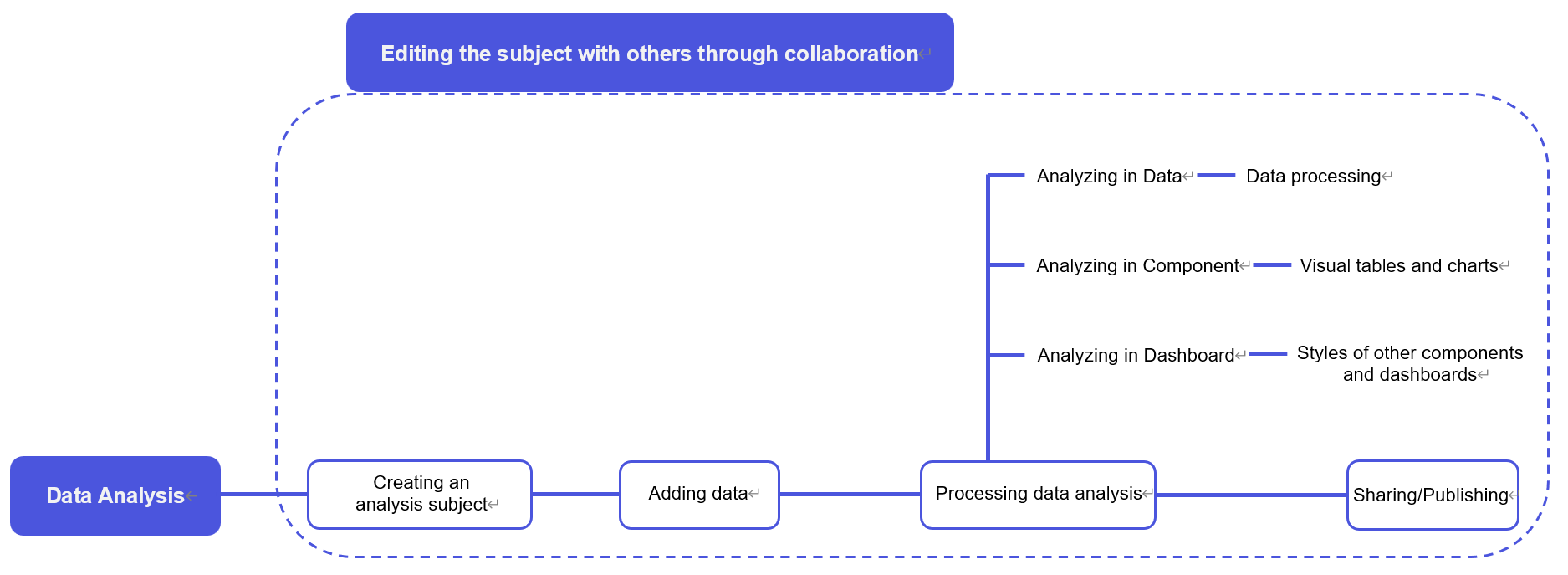
This document describes the unique concepts of the FineBI product through various modules for ease usage. My Analysis
My Analysis编辑
Term | Definition |
It is a storage space for resources used for personal analysis. You can engage in end-to-end data exploration and analysis in this space. | |
It is the core module of FineBI and the fundamental unit for conducting an analysis. Within an analysis subject, you can perform data editing, visual analysis, and dashboard export to complete the analysis process. Meanwhile, you can collaborate with others on an analysis subject. | |
It means collaborating with other design users on a folder or an analysis subject. Users you collaborate with can access or utilize the content related to the analysis subject. You can edit an analysis subject with others collaboratively. |

Data
Term | Definition |
FineBI provides the data filter function, allowing you to filter and save data for subsequent analysis. | |
Field | It represents a column in a data table. Creating a visual component involves dragging fields from a data table into the analysis area. Therefore, fields serve as the basic element for achieving visual analysis. |
It refers to the perspective from which we analyze data. You can analyze data from different dimensions. For the example above, you can analyze the sales fluctuations across different months or years. In this case, sales serve as the indicator. | |
Indicators quantify dimensions. Dimensions help analyze data from various perspectives, while indicators are the outcomes (numerical values or ratios) of analyzing these dimensions. For the example above, you can analyze the sales fluctuations across different months or years. In this case, sales serve as the indicator. |
Component
Term | Definition |
Data Visualization | It refers to converting data to easily understandable and interpretable visual forms such as tables, charts, and maps. Besides, it utilizes visual elements and interactive design to help better understand and analyze large amounts of data, allowing people to discover patterns, trends, correlations, and insights. |
Component | It refers to independent modules or elements that constitute the data visualization system or tool. Serving as the basic element for data displaying and interaction, these components can be utilized and combined in data visualization applications to create rich interfaces and functionalities. Visual components utilized for data analysis in FineBI include tables, charts, time filter components, and |
It refers to transforming multiple rows into one single row according to certain criteria, summarizing data into higher-level row-level data. | |
Indicator aggregation means displaying all indicators on the same value axis, enabling you to compare the values and trends of different indicators within the same dimension. Aggregate functions are used for summarizing a set of data. Generally, the values obtained through aggregate functions are used for re-calculations. Moreover, as you switch analysis dimensions, calculation fields automatically adjust to the changed dimensions. | |
It refers to the names of indicator fields in charts. You can drag the Indicator Name field into Graphic Property (Color, for example) to generate a legend. |
Dashboard
Term | Definition |
When viewing a dashboard, you may want to change the field to be filtered or need to filter data in multiple components at the same time. In this case, the filter component can help. | |
By setting linkages, you can click a component with the relevant data displayed in other components. | |
To jump from the current dashboard to other pages (such as web pages, other dashboards, and FineReport templates), you can use the jump function. | |
It (including drill up and drill down) allows you to dynamically change the level of dimensions when you view a dashboard. You can drill down to view specific data of cities below when viewing data of provinces. |
Public Data编辑
Term | Definition |
It refers to a storage space for data tables provided by enterprises for staff to view and use. |
Data Platform编辑
Term | Definition |
Data Platform | It targets data processing personnel. Its core value is supporting synchronization and complex processing of data within the same database or across different databases. Building on this, the platform also supports the organization of multi-branch, multi-process steps, facilitating enterprises in constructing underlying data that are of higher quality and more analyzable. |
Data Analysis Model编辑
Term | Definition |
AARRR model (also known as the Pirate Metrics), commonly used in the user operation process, explains the five metrics for achieving user growth: Acquisition, Activation, Retention, Revenue, and Referral. From customer acquisition to spreading and recommendation, the model forms a closed-loop pattern of a user's entire lifecycle, explaining the process of continuously expanded user base and sustained growth. | |
RFM analysis, a simple and practical customer analysis method proposed by American database marketing research institutes, evaluates customer data based on the following factors: Recency (R): interval between the current time and customers' last purchase time. Frequency (F): number of times customers purchase within a specified period of time. Monetary (M): customers' consumption capability, usually based on the average amount of consumption per transaction. The analysis evaluates and classifies customer data through the three key indicators to determine values of each segmented customers. Corresponding marketing strategies are tailored to customers with different features. | |
By classifying objects according to their main technical or economic characteristics, you can distinguish between prior and general objects, and thus apply different management methods. ABC analysis divides the analyzed objects into three categories: A, B, and C, and there are no fixed thresholds for each class. | |
Market basket analysis is an analysis method that associates two different products and explores their relations by analyzing user purchasing data. | |
The DuPont analysis method leverages the interrelationships among various key financial ratios to comprehensively assess a company's financial status. It's employed to evaluate the profitability and return on equity of a company, offering a financial perspective on the company's performance. The core idea is to break down the return on equity of a company into a series of financial ratio products, allowing for a more in-depth analysis and comparison of the company's operational performance. | |
Based on analyzing the impact of needs on user satisfaction, this model serves as a useful tool in classifying and prioritizing user needs, helping reflect the nonlinear relationship between product performance and user satisfaction. | |
BCG Matrix | BCG Matrix is also known as the growth-share matrix, Boston Consulting Group Analysis, portfolio diagram, product portfolio matrix, and so on. The matrix analyzes and determines a company's product portfolio structure based on sales growth rate (reflecting market attractiveness) and market share (reflecting company strength). |